A lit corner: two assets in one scene
What you have: case 2's own saved vase project, and a second file,
BoxTextured.glb. What you want: both in one scene, the box moved into
a corner beside the shelf of vases, a light staged over them with shadows on,
and one GLB out that carries both as nodes.
Where case 2 built a single object from nothing, this case is about a second object joining a project that already has one — the gizmo and its pivot, and the four panels T3.4 gives Scene mode: sources, shadows, environment, post.
1. Import into the existing project
Open case 2's own .f3dproj — the vase is already there, object 1, and it
opens as the shelf of three that case 2 saved: one object, with its mirror and
its array still on it. For a while it did not. The project file had nowhere to
write a modifier stack, so case 2 saved a shelf and this case opened a single
vase, and every picture on this page showed one. What this step needs next is a second file merged alongside it rather than
replacing it — ImportInto (doc-11a-n) exists exactly for this: it merges
a document's own objects, materials and images into a project's existing
tables, deduplicating anything that matches by content rather than doubling
it, and an agent over MCP can already reach it through
ModelSession.import.
This step now has a real button.
tut-08, found writing this case, is closed: the toolbar's own Open now sits beside Import (TopBarActions) — the same file picker and the same unit/axis/cleanup screen Open already shows, ending inImportInto's own merge into the project already open rather than_installOpened's wholesale replacement. A person can pickBoxTextured.glbthere directly and reach exactly the two new objects this step describes. This walkthrough still narrates the result the way this case's own fixture script builds it — driven directly against the session/command layer, the same route an agent over MCP already has — for a reason that has nothing to do with the button:ReplaceDocument, what an import actually runs, is deliberately not journalable (see "Proving it" below), so a.jsonlreplay was never going to see this step regardless of how it was driven. The app's own UI path is covered separately, by a widget test that drives the real Import button end to end (apps/flutter3d_modeler/test/file_import_test.dart).
BoxTextured.glb itself turns out to hold two nodes, not one — its single
textured cube sits on a child node under an empty root, the file's own way
of carrying a name and a transform separately from the mesh. Importing it
gives the project two new objects: object 2, the empty root, and object 3,
the box mesh, parented under it. Clicking the imported asset once in the
outliner selects object 2 — the root — the way any parent/child pair in
this project already behaves: move or turn the root, and the mesh riding
under it goes along, the same "an object's transform is local to its
parent" rule the renderer itself already follows.
2. The gizmo and its pivot
Grab the move gizmo and drag the box past the end of the shelf, into the
corner beside the third vase: MoveBy((3.0, 0.5, -0.4)) answers
"move — object 2". The array puts the vases at 0, 0.9 and 1.8 along X, so
anything short of 2.5 lands the box inside one of them. Then the rotate
gizmo, turning it to face into that corner: RotateBy(axis: (0, 1, 0), radians: 0.6, pivot: individual).
Pivot is the point a turn happens about, chosen from the same panel the
gizmo itself sits in — median (everything selected turns together, as if
gripped as one) or individual (each object turns about its own origin).
With one object selected the two give the same answer here, but naming
individual is still the honest choice: it is the pivot a corner placement
actually wants once a second object joins the selection, and the command
takes the argument regardless of how many objects are picked.
3. Scene mode: a source, its shadow, an environment, post
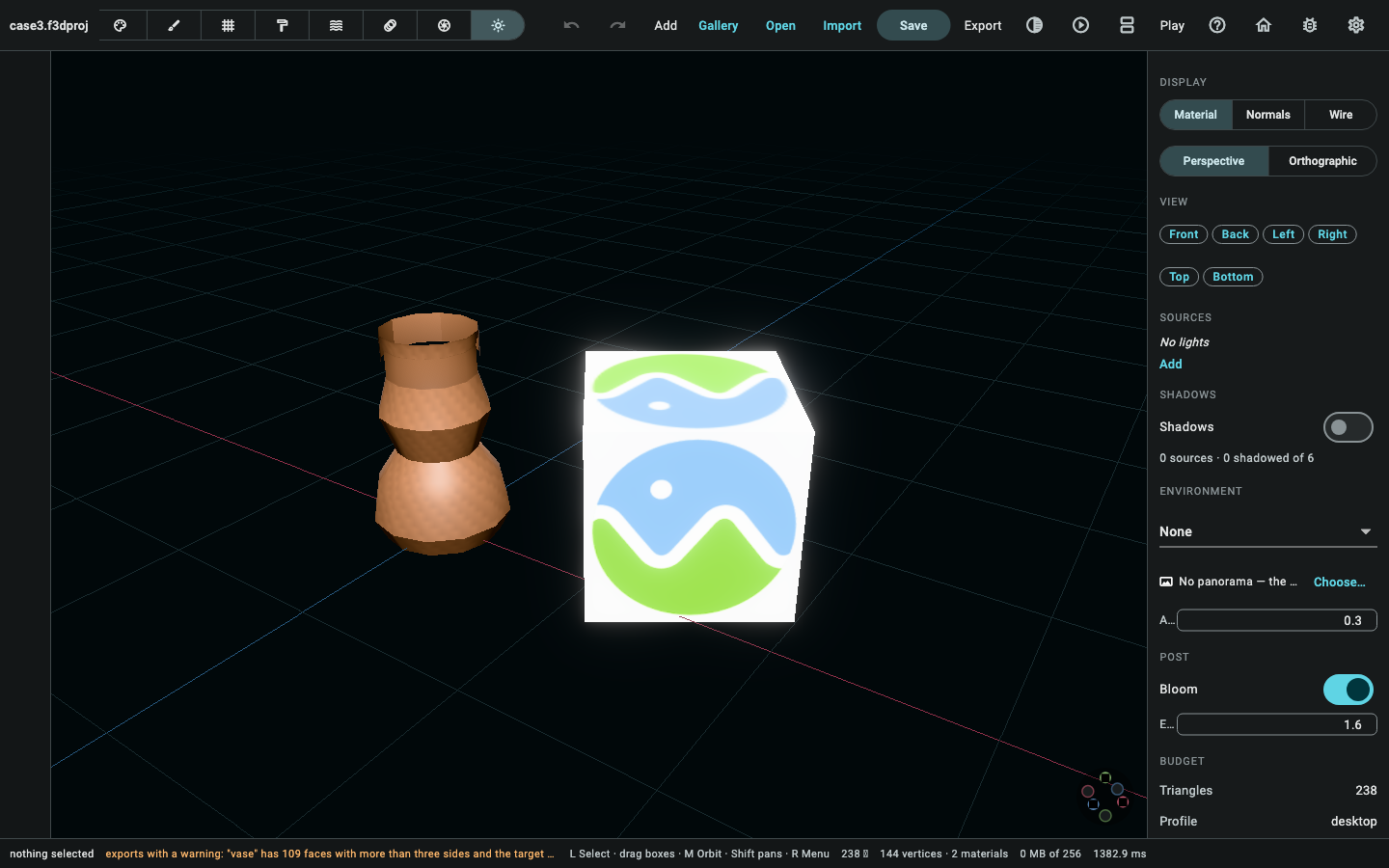
Switch to Scene mode. Its four panels each set one part of the project's own
SceneLighting:
- Sources — the panel's own Add button, with Point picked from
its light-type dropdown, calls
AddLight(type: point). The gizmo then places it (SetLightTransform, to(2.4, 1.4, 0.9)) up and between the last vase and the box, the panel's own colour and intensity fields warm it slightly and raise it (SetLightField('color', (1.0, 0.92, 0.78)),SetLightField('intensity', 4.5)), and this same panel's own Casts shadow checkbox turns it on for this light (SetLightField('castsShadow', true)). - Shadows — the scene-wide toggle
(
SetSceneLightingField('shadows', true)) — a request the light's owncastsShadowand this scene-wide switch both have to grant, perProjectLight.castsShadow's own doc comment. - Environment — the built-in sky presets, Studio
(
SetEnvironment(studio)) rather than the defaultnone, and this panel's own Ambient slider, lowered for contrast against the one lit source (SetSceneLightingField('ambientIntensity', 0.12)). - Post — Exposure, raised slightly
(
SetSceneLightingField('exposure', 1.25)), and Bloom (SetSceneLightingField('bloomEnabled', true)).
What a headless render shows now, and what it still does not.
renderProject/renderSheet— the same functions this page's own "expected result" picture below comes from — draw every project under a fixed key/fill pair, and now also this step's own point light, its colour and its shadow request, additively over that fixed pair: a project that never touches lighting still renders exactly as it always did, and one that does now shows it, in the live viewport and in a headless render alike (tut-07, fixed alongsidemat-23's ownLightingSyncwiring). Ambient and Environment are the two fields that still do not reach a picture: the engine's own ambient term has a different default than the document's own field, so wiring it in would have rebrightened every picture in this build for a field nothing yet asks to see, and "Studio" has no baked environment map behind it at all yet — both stay a real, separate, narrower gap than the one this step used to name.
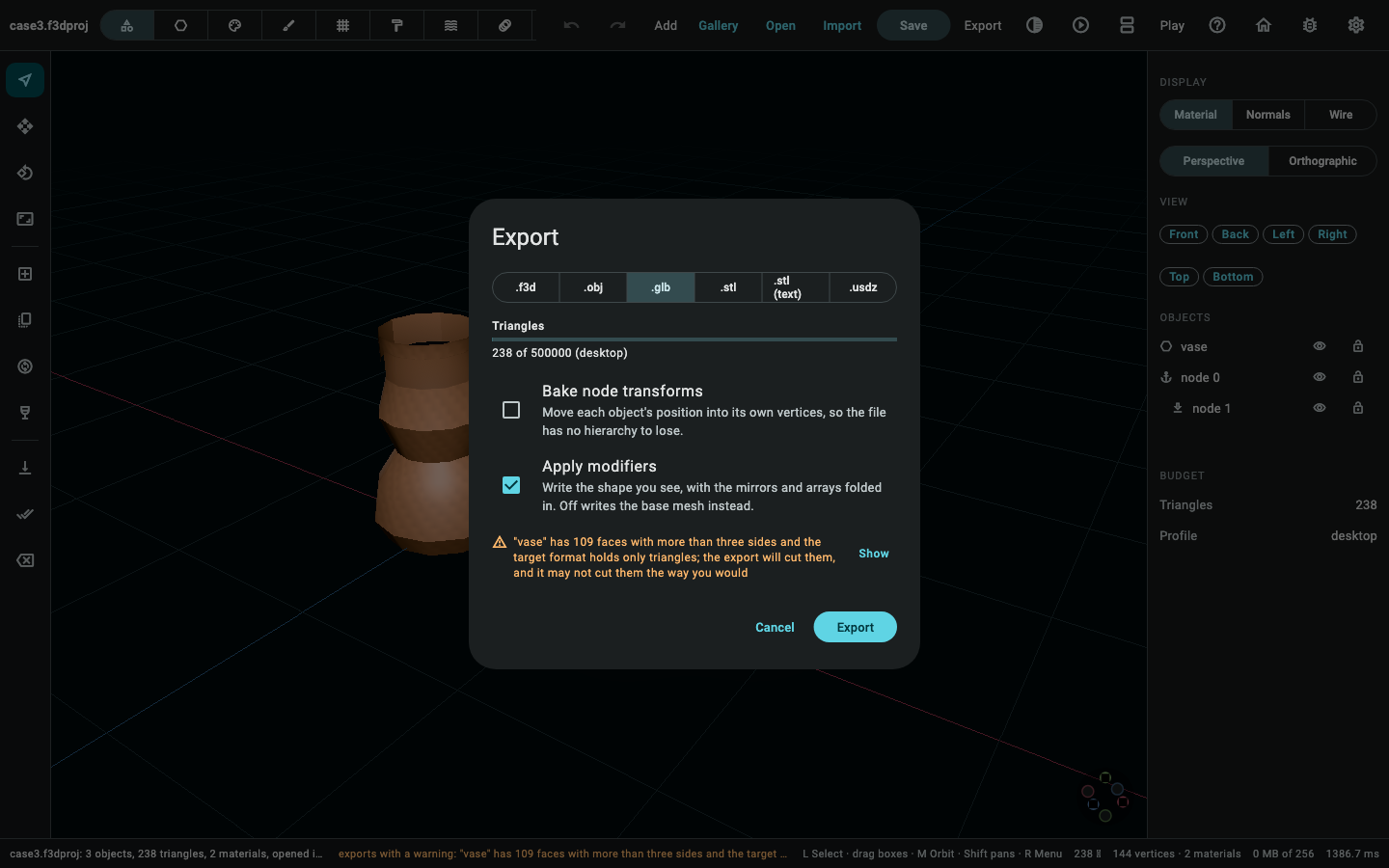
4. Export, with both nodes
Export → GLB. The readiness check finds one warning, the same shape case 1's own diagnosis step showed:
exports with a warning: "vase" has 109 faces with more than three sides and
          the target format holds only triangles; the export will cut them, and it may
          not cut them the way you would
A body of revolution's own quads and the loop cut's own n-gons, expected on a mesh nobody has triangulated by hand — a warning, not an error, and the export proceeds. Decoding the written GLB back:
- 3 nodes — the vase, the box's own empty root at its moved-and-turned transform, and the box's mesh as that root's child.
- 2 surfaces — the vases and the box mesh, each a node with real geometry; the empty root carries none of its own. The three vases are one surface, because they are one object: the export folds its mirror and its array into the mesh it writes.
- 2 materials — the vase's own "glazed clay" and the box's own
textured material from
BoxTextured.glb. They do not match, so both stay in the export table rather than being folded into one —ImportIntoonly dedupes materials that would write the identical manifest entry, and these two genuinely do not.
5. Into the cabinet
Upload the GLB the same way case 1 did — sign in at models.pleion.dev, use
the site's own uploader, and Open in viewer loads it at /app/.
Notes on this page
Time to complete: not recorded yet. TODO: a person should walk this
case by hand on a real machine and fill in a line here — "n minutes,
date, machine" — the way rel-09's own cohort rows do. Nothing in this
session could actually run the desktop app, so no time is claimed.
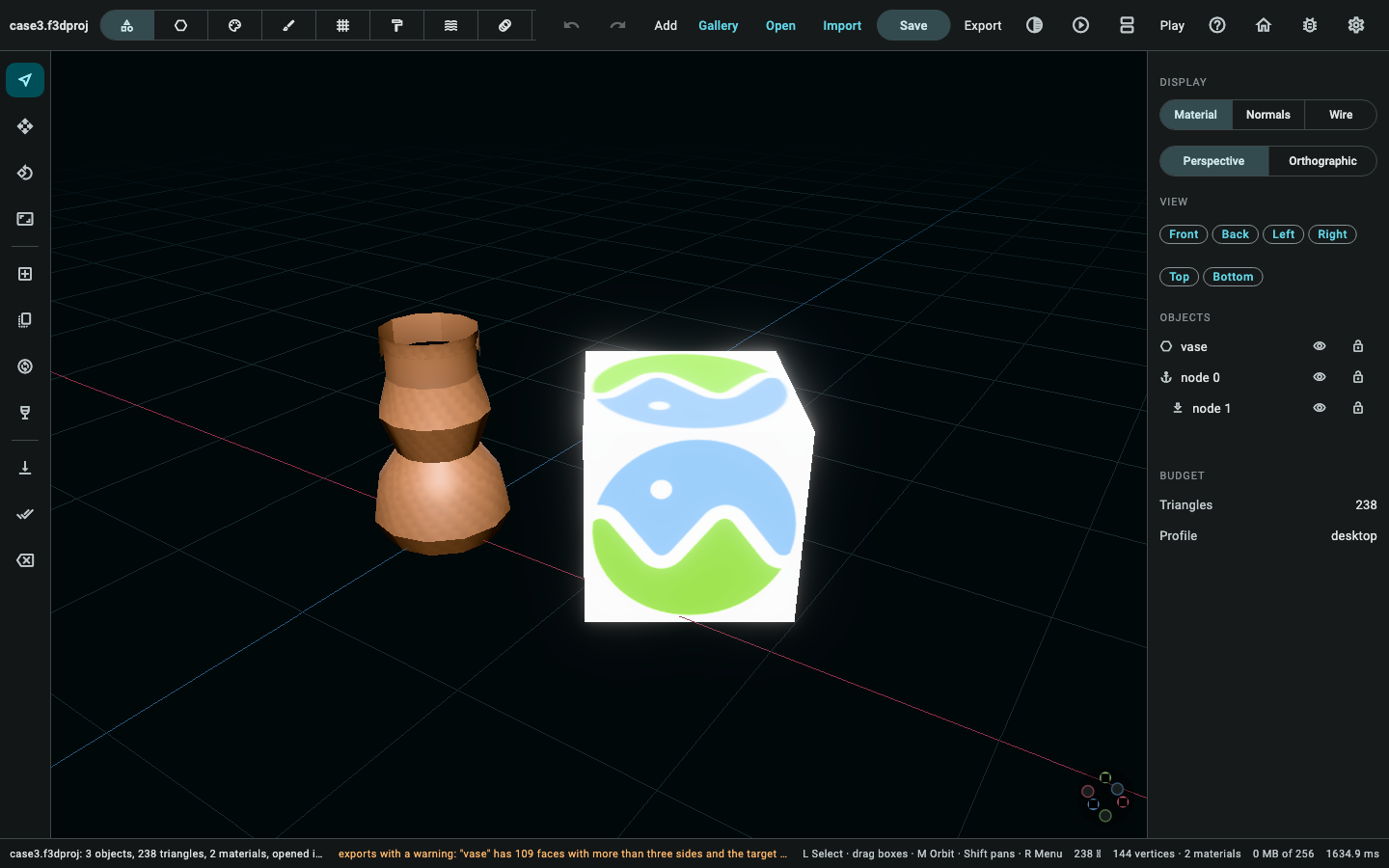
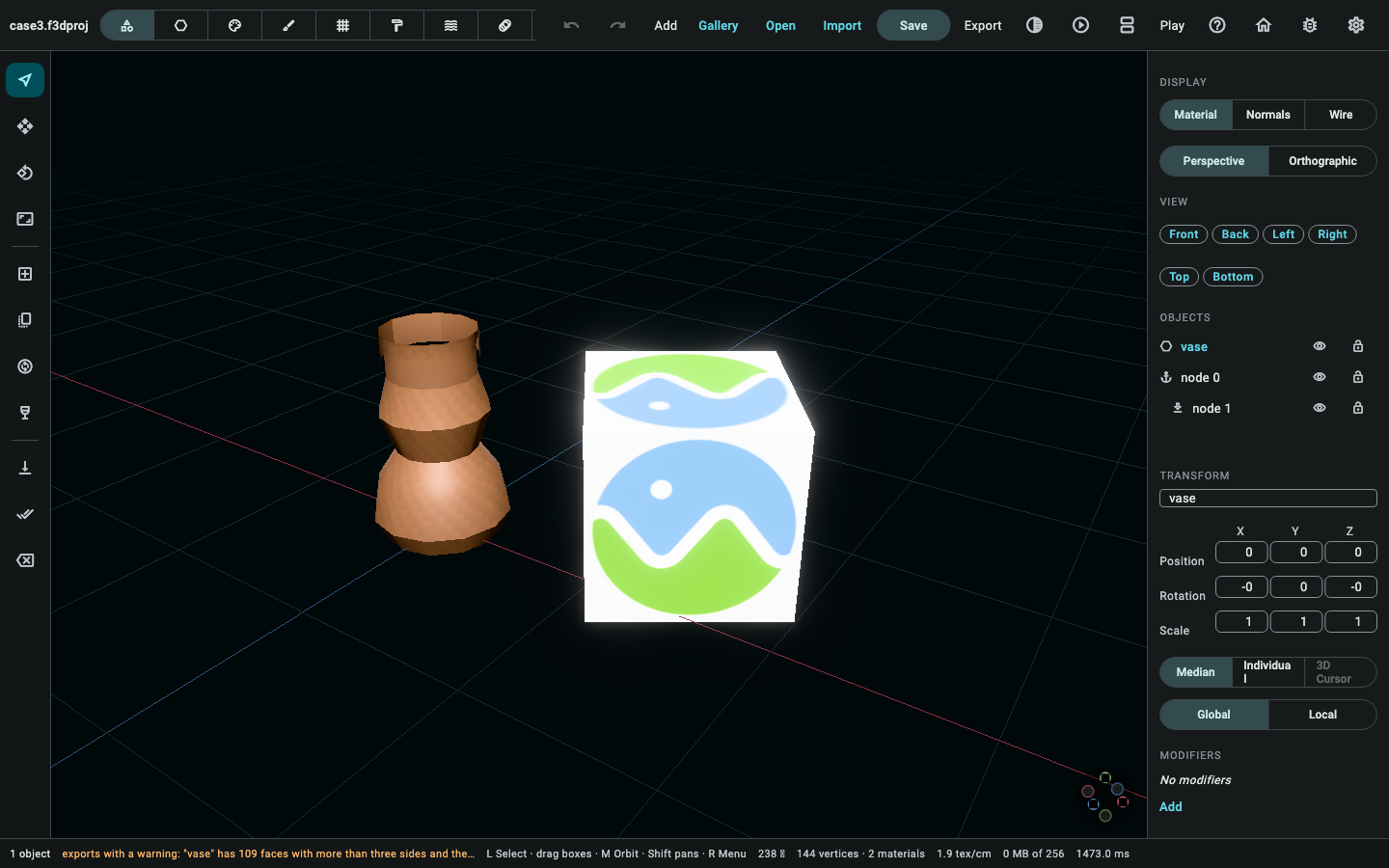
Screenshots. All four pictures of the editor on this page are real,
taken from the running application over case 3's own saved document: the
document as it opens with both objects in the outliner, the viewport with
the box selected, the Scene mode panel, and the export screen. They are taken headlessly rather than by hand —
apps/flutter3d_modeler/test/tutorial_case_screenshots_test.dart drives the
real editor under the software rasteriser and photographs the window — so
they are goldens: a run says whether a panel has moved since, and one
command regenerates every page's pictures at once.
(cd apps/flutter3d_modeler && flutter test \
            test/tutorial_screenshots_test.dart \
            test/tutorial_case_screenshots_test.dart --update-goldens)
          dart run tool/publish_modeler_screenshots.dart
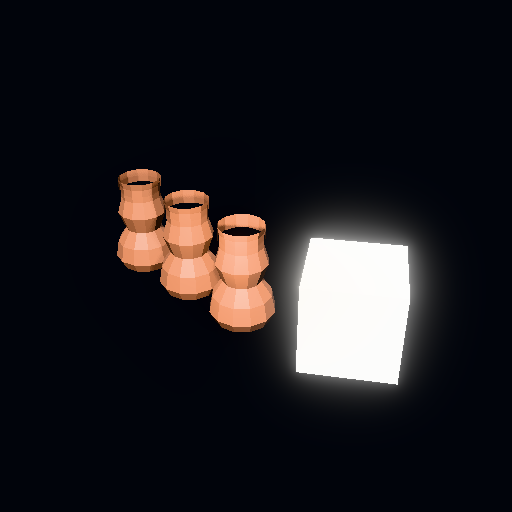
The one real render. 03-lit-corner.png is a genuine CPU render of this
case's own project data — the vase and the box at their real, moved and
turned positions, through the same renderProject the render/
renderSheet MCP tools use, now lit by the point light this case's own
step 3 sets up: its colour, intensity and shadow request, additive over the
viewport's own fixed key/fill pair (tut-07, fixed alongside mat-23's own
LightingSync wiring). The environment preset and the ambient level are the
two fields that still do not reach this picture — see the callout in step 3
and tut-07 in doc/modeler-tutorial-gaps.md for why.
Proving it. packages/flutter3d_model_mcp/test/fixtures/tutorial/ case3_scenario.dart builds exactly the project this page describes, against
a live ModelSession seeded with case 2's own saved project
(case3StartingProject, which reads the committed case2.f3dproj through
readProject and merges BoxTextured.glb into it through the free
importInto function — the same one ModelSession.import itself calls,
used directly here rather than through the session for the same reason
case 1's own STL import bypasses it: ReplaceDocument, what an import
actually runs, is deliberately not journalable — see the callout in step 1;
tut-08, the separate reason a person once could not drive this particular
step through the app's own UI at all, is closed, and
file_import_test.dart is what now proves the button rather than this
fixture script, which stays command-layer-driven so case3.f3dproj/
case3.glb stay byte-for-byte reproducible without a live renderer).
tutorial_scenarios_test.dart's
own case-3 group checks four things: the scenario reaches the exact project
committed as case3.f3dproj and exports the exact case3.glb, byte for
byte, with compareModelDocuments confirming the decoded GLB matches too;
the exported GLB really does carry both assets as separate surface-bearing
nodes at different, non-identical placements, keeping their own two
materials rather than merging them; the project's own SceneLighting holds
the light, the shadow request, the studio environment and bloom exactly as
this page describes; and — the same fix case 2's own tut-05 closed,
now checked at this case's own plain object level — case3.jsonl, replayed
through CommandJournal.replay from right after the import (a cold
CommandJournal still cannot see the import itself, for the reason
above), now rebuilds the exact document this case's own fixture holds:
session.select picking the box by id is a real, replayable
SelectElements command, so the pick the moveBy right after it depends
on is on the journal too. Driving it live is still what
dart test test/tutorial_scenarios_test.dart actually does; the cold
replay from right after the import is now one more thing it checks.